
AI Bot Analytics for WordPress
Connect your WordPress website to ELNIQ GEO in minutes and monitor AI crawler activity directly from your WordPress dashboard. Access more comprehensive website analytics through the ELNIQ GEO platform.
Connect Your WordPress Site →Free to connect. Data collection starts with a paid plan.

The Right Integration for Your WordPress Website
ELNIQ GEO supports multiple website connection methods. For WordPress websites, our dedicated plugin offers a simple setup, reliable data collection, and AI crawler monitoring directly in your WordPress dashboard.
AI Bot Analytics for WordPress
Easy Installation
Install the plugin without manually editing your website's code.
Reliable Data Collection
A WordPress-native integration without the limitations of pixel-based tracking.
Built-in Monitoring
View AI crawler activity directly in your WordPress dashboard.
ELNIQ GEO Integration
Connect your website to the ELNIQ GEO analytics platform.
Other Connection Methods Are Also Available
ELNIQ GEO also supports manual installation and pixel-based integration for compatible websites. Pixel-based installation may be easier in some environments but can provide less complete data.
Your WordPress Integration. Your ELNIQ GEO Analytics.
AI Bot Analytics for WordPress connects your website to ELNIQ GEO and brings AI crawler monitoring into your WordPress dashboard.
The ELNIQ GEO platform provides more comprehensive analytics, including website-level visibility signals, crawler activity, page-level analysis, AI traffic analytics, access and error monitoring, and actionable recommendations.
The plugin complements your ELNIQ GEO account — it does not replace the platform.
Monitor AI Crawler Activity Without Leaving WordPress
View crawler activity, request statistics, and monitoring data directly in your WordPress admin dashboard.
Explore AI Crawler Requests in Detail
Review recorded AI crawler requests, including available details such as crawler identity, requested URLs, timestamps, and trust score.

Why use the plugin?
Native WordPress Integration
No Hidden Files
AI Crawler Monitoring
robots.txt Monitoring
Platform Synchronization
Dashboards & Reports
What Data Is Collected?
ELNIQ GEO records available technical data about AI crawler requests to help you understand how AI systems access your website.
Who is it for?
 Website owners
 SEO specialists
 GEO specialists
 Marketing teams
 Agencies
How to Install & Connect the WordPress Plugin
From adding your website to monitoring AI crawlers — follow these steps to get connected.
Part 1 — In ELNIQ GEO
-
1
Create an Account or Log In
Access the ELNIQ GEO platform.
-
2
Add Your WordPress Website
Add the website you want to monitor.
-
3
Download the Plugin
Select WordPress Plugin from the available connection methods and download the ZIP file.
Part 2 — In WordPress
-
4
Upload the ZIP File
In your WordPress admin dashboard, go to:
Plugins → Add Plugin → Upload Plugin
Select the downloaded ZIP file and click Install Now.
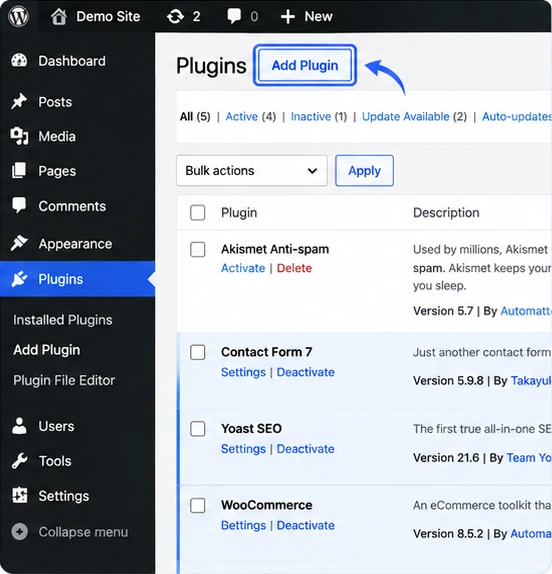
Plugins → Add Plugin 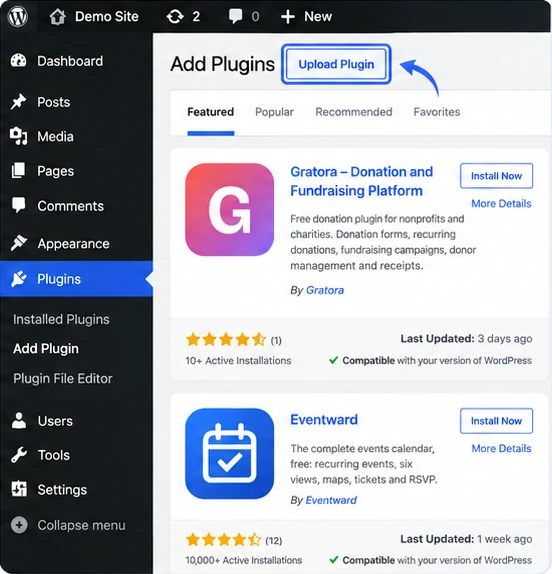
Add Plugin → Upload Plugin 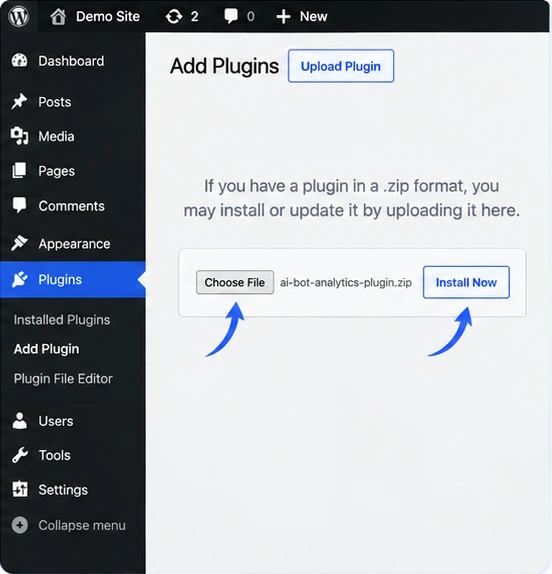
Choose File → Install Now -
5
Activate the Plugin
After installation, click Activate Plugin.
-
6
Connect to ELNIQ GEO
Go to:
Settings → ELNIQ GEO → Connect
Follow the connection process to link the plugin to your ELNIQ GEO account.
Website connection is free. AI crawler data collection begins only after activating a paid ELNIQ GEO plan. No historical data is collected before activation.
Ready to Connect Your WordPress Site?
Create your ELNIQ GEO account, add your website, and get the WordPress plugin directly from the platform.